Showing posts with label Launcher(Themes). Show all posts

Saturday, May 4, 2013

CircleLauncher v2.0.5


Requirements: ANDROID 2.1 and up
Overview: Start your apps or call your best friends - but with style!

This widget will help you to start your prefered apps or call your best friends - but with style!

NEW: also available - CircleWeather!

You can add some frequently used apps, contacts or bookmarks to this launcher and start those apps, contacts or bookmarks with one click from a circle, a horizontal or a vertical line. Use the included launcher icons, load your own image or use a icon from any icon pack (CircleLauncher icon packs and ADW launcher icon packs supported). If you slide over the icons, they are animated a little bit mac-like ... just try it!

Some icons in the screenshots are from 'CircleLauncher IconPack One' and the wallpaper is 'wp clock full'.

Facebook-User, please read: Restricted contacts are created by the Facebook sync adapter. These contacts are accessible to a whitelist of applications, which is specified and enforced by Facebook. The restricted contact API is private, which means that nobody (with the exception of Facebook) should be using it at this point. So the only way to get the pictures from your Facebook contacts is to use another tool to synchronize. I would suggest to use 'SyncMyPix', please try it!

To add widget press on Home: Menu->Add->Widget->CircleLauncher

Please don't move the app to the sd card - it won't work! And if the widget don't appear after the installation, just wait a few moments.

Recent changes:
hot fix for problems with phone number formatting

Download Instructions:
http://www.filesonic.com/file/3007670595
Reade more >>

Thursday, May 31, 2012

MIUI.ADW iPhone Launcher v1.2.16


Requirements: for Android version 2.1 and higher
Overview: Inpsired by the popular MIUI ROM Launcher, this is a themed and modified fork of the well known ADW Launcher.

It has a beautiful large icon and dockbar with the look and feel of MIUI/iPhone but is available for all of users who have no port available or technical expertise to tackle the install.

Can be used in standalone mode as a feature filled launcher or as a theme in ADW / ADW Ex!!

Some of the Many Features!
-2 icon looks (square/round).
-Vertical/Horizontal scrolling dock
-Swipe the dock to open/close the app drawer
-"Fancy" app backgrounds
-Allows up to 25 screens
-9 different animation options for open/close app drawer and folders
-2 different dock background options
-Precisely tuned for HDPI and MDPI devices. From hero to nook to galaxy tab.
-Complete icons are available for customization from
MIUIADWThemepack on shortcut edit
-MIUI/iPhone wallpaper is available in MIUI.ADW.Launcher wallpaper gallery

Please report any issues or bugs to me in email!

Recent changes:
Add Screen transitions
Remove round theme, add more square.
Bugfixes/Updates

Download Instructions:
http://www.filesonic.com/file/2999527745

Mirror:
http://www.wupload.com/file/1920595882
http://www.MegaShare.com/3695602
http://www.multiupload.com/KUCG67R3OF
Reade more >>

Friday, May 25, 2012

Launcher 7 - Donate v1.0.1.20.1


Requirements: Android 2.1+
Overview: A Window(s) Phone 7 style launcher for Android.

Unlike other current WP7 launchers (Window(s) Phone Android, Metro UI), this one allows you to properly modify your start screen. Just long press on a tile and drag tile where you want!

Features:
- Ad-free
- 1x1, 2x1 and 1x2 tiles.
- tile bitmaps can cover the whole tile
- widgets on tiles
- tile reordering
- live contacts tile

TODO-list:
- configurable animation parameters (soon)
- clock tile of sorts
- more animated tiles
- facebook integration

What's in this version:
-Fixed issue with contact tile images in qHD resolution

 Download Instructions:
http://www.MegaShare.com/3700508

Mirrors:
http://www.filesonic.com/file/3156244014
http://www.wupload.com/file/1979562857
http://www.multiupload.com/YEVZSXS8GU
Reade more >>

GO Launcher EX v2.63 beta3


Requirements: Android v2.0+
Overview: GO Launcher EX is the extended version of GO Launcher, one of the most popular home apps in Android Market. It’s a highly customizable home replacement application, which will run when you press your android phone’s HOME key. GO Launcher EX supports hundreds of themes, fast flip speed and tons of useful functions.

GO Launcher EX is the extended version of GO Launcher, one of the most popular home apps in Android Market. It’s a highly customizable home replacement application, which will run when you press your android phone’s HOME key.
GO Launcher EX supports hundreds of themes, fast flip speed and tons of useful functions.

Features:
- Hundreds of themes
- Fancy home screen transition
- Smooth scrolling experience
- Icon popup menu
- Folder and task manager in app drawer
- Gesture supported
- Scrollable & resizable widgets supported

Tips:
1. Pinch fingers to enter preview screen and edit home screen pages
2. Search “go launcher theme” to get themes and select them in “Themes preferences”
3. Set screen transition and flip speed in “Display settings”
4. Long press icons on home screen to active popup menu
5. Long press icons in app drawer to edit location, uninstall apps and create folders
6. If you can't set GO Launcher as your default home, download "Home manager"

Important:
1. This is a totally free application and we need directly call phone numbers permission to enable the direct dial shortcut on home screen.
2. We will bring out some charged apps like themes and widgets, but most of our apps are free!
3. The weather and clock widget in screenshots belongs to GO Weather, one of the applications developed by our team!
4. The other widgets in screenshots are our GOwidgets, try to search and download them in Android Market!
5. Download our “Classic Theme GO Launcher EX” to get the wallpaper!
6. GO Dev team has released GO Launcher EX, GO SMS, GO Weather and GO Contacts. More and more applications are coming soon!

Think of an extreme makeover to your phone? Try this out!

Recent changes:
1. (New) Widget management function;
2. (New) Shortcut to GO Locker (Add-Shortcut-GO Launcher-Go Locker);
3. (Improve) App search and transition effect in app drawer;
4. (Improve) Option to not open horizontal mode when opening physical keyboard (Preference-Operation settings-Screen orientation);
5. (Fix) Search errors after inputting special characters in app drawer;

Download Instructions:
http://depositfiles.com/files/jg8o8pdio
http://www.filefat.com/51pzmldmnhps
http://www.multiupload.com/6LXDYE6KIR
Reade more >>

Balancer Launcher v1.0.4


Requirements: for Android version 2.1 and higher
Overview: Balancer Launcher is a Home(Launcher) app, like ADWLauncher,LauncherPro,Go Launcher,Launcher7,Zeam,Regina Launcher etc, which is focused on provide users a brief and useful Home.


The Launcher has smooth ui effect and perfect performance, it can launch application quickly.
Be compared with some other similar applications, It has better performance and do cut off some useless settings, we think a simple and cool application is what a user wanted excatly and we will try our best to create one for you.

Features:
* Support apps' sort
* Can uninstall apps quickly
* Built-in File Browser
* Cool wallpapers
* good sunny clock widget

Tips:
1. Long click desktop icon can drag it into the bottom button.
2. Long click item of file browser item can enter into edit model.
3. if you have any ideas or suggestions, you can email us with "Contact Us " menu~

What's in this version:
fix sayHello reminder can not displayed bug

Download Instructions:
http://www.filesonic.com/file/3173649995

Mirror:
http://www.wupload.com/file/1998739067
http://www.MegaShare.com/3702576
http://www.multiupload.com/0M995CWQ60
Reade more >>

Wednesday, May 23, 2012

Full Screen Launcher Pro v1.4.1


Requirements: for Android version 2.2 and higher
Overview: Ad free version of the Full Screen Launcher

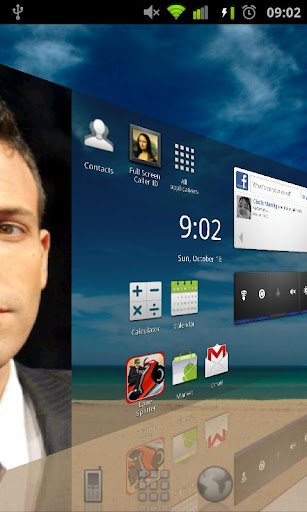
A 3d launcher for your Android device

Features :
- unlimited space for your applications
- 3d wall for applications
- 3d wall for contacts
- widget support
- live wallpaper support
- icon reflection

What's in this version:
improved : tile reflection
various optimisations

Download Instructions:
http://www.filesonic.com/file/3171605385

Mirror:
http://www.wupload.com/file/1998653287
http://www.MegaShare.com/3702504
http://www.multiupload.com/3ICY3695SL
Reade more >>

Tuesday, May 15, 2012

Full Screen Launcher Pro v1.4.2


Requirements: for Android version 2.2 and higher
Overview: Ad free version of the Full Screen Launcher

A 3d launcher for your Android device

Features :
- unlimited space for your applications
- 3d wall for applications
- 3d wall for contacts
- widget support
- live wallpaper support
- icon reflection

What's in this version:
improved : tile reflection
various optimisations

Download Instructions:
http://www.filesonic.com/file/3183594755

Mirror:
http://www.wupload.com/file/2000065212
http://www.MegaShare.com/3703136
Reade more >>

Wednesday, December 28, 2011

Full Screen Launcher Pro v1.6.3 Apk App


Requirements: for Android version 2.2 and higher
Overview: Ad free version of the Full Screen Launcher


A 3d launcher for your Android device

Features :
- unlimited space for your applications
- 3d wall for applications
- 3d wall for contacts
- widget support
- live wallpaper support
- icon reflection

What's in this version:
Fix bug when moving widgets inside folders

Download Instructions:
http://www.filesonic.com/file/EBAUbdz

Mirror:
http://www.MegaShare.com/3814802
Reade more >>

Zeam Launcher v3.1.10 Apk App


Requirements: Android OS 2.2+
Overview: Zeam is a minimalistic launcher alternative for Android 2.2 and above devices.


What's in this version:
new folders layout
smoother vertical apps grid scrolling
ics: manage wallpapers defaulted
ics: fixed dock bootstrapping for browser
ics: fixed wrong default screen on startup
ics: preferences icon updated
smaller apk size

Download Instructions:
http://www.filesonic.com/file/DXf3xYU

Mirror:
http://www.MegaShare.com/3813392
Reade more >>

Tuesday, December 27, 2011

GO Launcher EX v2.71 beta4 Apk App


Requirements: Android v2.1+
Overview: GO Launcher EX is the extended version of GO Launcher, one of the most popular home apps in Android Market. It’s a highly customizable home replacement application, which will run when you press your android phone’s HOME key. GO Launcher EX supports hundreds of themes, fast flip speed and tons of useful functions.

GO Launcher EX is the extended version of GO Launcher, one of the most popular home apps in Android Market. It’s a highly customizable home replacement application, which will run when you press your android phone’s HOME key.
GO Launcher EX supports hundreds of themes, fast flip speed and tons of useful functions.

Features:
- Hundreds of themes
- Fancy home screen transition
- Smooth scrolling experience
- Icon popup menu
- Folder and task manager in app drawer
- Gesture supported
- Scrollable & resizable widgets supported

Tips:
1. Pinch fingers to enter preview screen and edit home screen pages
2. Search “go launcher theme” to get themes and select them in “Themes preferences”
3. Set screen transition and flip speed in “Display settings”
4. Long press icons on home screen to active popup menu
5. Long press icons in app drawer to edit location, uninstall apps and create folders
6. If you can't set GO Launcher as your default home, download "Home manager"

Important:
1. This is a totally free application and we need directly call phone numbers permission to enable the direct dial shortcut on home screen.
2. We will bring out some charged apps like themes and widgets, but most of our apps are free!
3. The weather and clock widget in screenshots belongs to GO Weather, one of the applications developed by our team!
4. The other widgets in screenshots are our GOwidgets, try to search and download them in Android Market!
5. Download our “Classic Theme GO Launcher EX” to get the wallpaper!
6. GO Dev team has released GO Launcher EX, GO SMS, GO Weather and GO Contacts. More and more applications are coming soon!

Think of an extreme makeover to your phone? Try this out!

Recent changes:
1. (New) Supports high-resolution and 7/10 inch pads;
2. (Improve) Continue fix and rewrite toast info;
3. (Improve) If no enough room for adding GO widgets, highlight the selectable screens;
4. (Fix) Go to our blog after clicking the feedback button with a no-mail-apps phone;
5. (Fix) The auto-restart issue of changing icon size.

Download Instructions:
http://www.filesonic.com/file/nhAk39l

Mirror:
http://www.filefat.com/o6q0ohw1mz5n
Reade more >>

iLauncher v2.0.10.7 Apk App


Requirements: Android 2.1+
Overview: iPhone style home screen launcher
This is an iPhone style home screen launcher. The launcher makes your phone work just like a real iPhone.

iPhone style home screen launcher
This is an iPhone style home screen launcher. The launcher makes your phone work just like a real iPhone.
- Smooth scrolling.
- Icons have rounded corners and gloss effects.
- Long touch icons to move them around and position them as you like.
- Supports a customizable dock-bar.
- Easily uninstall apps from your home screen.
- Press the back hardware key to exit edit mode.
- Spotlight search

What's in this version:
2.0.10.7
rollback on icon processing
'Exit Launcher' menu disabled for some memory issues

Download Instructions:
http://www.filesonic.com/file/S9wDcO7
http://www.multiupload.com/6H14LTKLNL
Reade more >>

GO Launcher EX v2.71 beta3 Apk App


Requirements: Android v2.1+
Overview: GO Launcher EX is the extended version of GO Launcher, one of the most popular home apps in Android Market. It’s a highly customizable home replacement application, which will run when you press your android phone’s HOME key. GO Launcher EX supports hundreds of themes, fast flip speed and tons of useful functions.

GO Launcher EX is the extended version of GO Launcher, one of the most popular home apps in Android Market. It’s a highly customizable home replacement application, which will run when you press your android phone’s HOME key.
GO Launcher EX supports hundreds of themes, fast flip speed and tons of useful functions.

Features:
- Hundreds of themes
- Fancy home screen transition
- Smooth scrolling experience
- Icon popup menu
- Folder and task manager in app drawer
- Gesture supported
- Scrollable & resizable widgets supported

Tips:
1. Pinch fingers to enter preview screen and edit home screen pages
2. Search “go launcher theme” to get themes and select them in “Themes preferences”
3. Set screen transition and flip speed in “Display settings”
4. Long press icons on home screen to active popup menu
5. Long press icons in app drawer to edit location, uninstall apps and create folders
6. If you can't set GO Launcher as your default home, download "Home manager"

Important:
1. This is a totally free application and we need directly call phone numbers permission to enable the direct dial shortcut on home screen.
2. We will bring out some charged apps like themes and widgets, but most of our apps are free!
3. The weather and clock widget in screenshots belongs to GO Weather, one of the applications developed by our team!
4. The other widgets in screenshots are our GOwidgets, try to search and download them in Android Market!
5. Download our “Classic Theme GO Launcher EX” to get the wallpaper!
6. GO Dev team has released GO Launcher EX, GO SMS, GO Weather and GO Contacts. More and more applications are coming soon!

Think of an extreme makeover to your phone? Try this out!

Recent changes:
1. (New) Supports high-resolution and 7/10 inch pads;
2. (Improve) Continue fix and rewrite toast info;
3. (Improve) If no enough room for adding GO widgets, highlight the selectable screens;
4. (Fix) Go to our blog after clicking the feedback button with a no-mail-apps phone;
5. (Fix) The auto-restart issue of changing icon size.

Download Instructions:
http://www.filesonic.com/file/JHBPnl3

Mirror:
http://filepost.com/files/bce2d5b9
Reade more >>

Monday, December 26, 2011

iLauncher v2.0.10.6 Apk App


Requirements: Android 2.1+
Overview: iPhone style home screen launcher
This is an iPhone style home screen launcher. The launcher makes your phone work just like a real iPhone.


iPhone style home screen launcher
This is an iPhone style home screen launcher. The launcher makes your phone work just like a real iPhone.
- Smooth scrolling.
- Icons have rounded corners and gloss effects.
- Long touch icons to move them around and position them as you like.
- Supports a customizable dock-bar.
- Easily uninstall apps from your home screen.
- Press the back hardware key to exit edit mode.
- Spotlight search

What's in this version:
2.0.10.6
tried to fix crashes. hope it works.
can change wallpaper
can exit launcher

Download Instructions:
http://www.filesonic.com/file/qyQGROt
Reade more >>

Sunday, December 25, 2011

Speed Launcher Pro v1.0 Apk App

This summary is not available. Please click here to view the post.
Reade more >>

Saturday, December 24, 2011

GO Launcher EX v2.71 beta2 Apk App


Requirements: Android 2.1+
Overview: GO Launcher EX is the extended version of GO Launcher, one of the most popular home apps in Android Market. It’s a highly customizable home replacement application, which will run when you press your android phone’s HOME key. GO Launcher EX supports hundreds of themes, fast flip speed and tons of useful functions.

GO Launcher EX is the extended version of GO Launcher, one of the most popular home apps in Android Market. It’s a highly customizable home replacement application, which will run when you press your android phone’s HOME key.
GO Launcher EX supports hundreds of themes, fast flip speed and tons of useful functions.

Features:
- Hundreds of themes
- Fancy home screen transition
- Smooth scrolling experience
- Icon popup menu
- Folder and task manager in app drawer
- Gesture supported
- Scrollable & resizable widgets supported

Tips:
1. Pinch fingers to enter preview screen and edit home screen pages
2. Search “go launcher theme” to get themes and select them in “Themes preferences”
3. Set screen transition and flip speed in “Display settings”
4. Long press icons on home screen to active popup menu
5. Long press icons in app drawer to edit location, uninstall apps and create folders
6. If you can't set GO Launcher as your default home, download "Home manager"

Important:
1. This is a totally free application and we need directly call phone numbers permission to enable the direct dial shortcut on home screen.
2. We will bring out some charged apps like themes and widgets, but most of our apps are free!
3. The weather and clock widget in screenshots belongs to GO Weather, one of the applications developed by our team!
4. The other widgets in screenshots are our GOwidgets, try to search and download them in Android Market!
5. Download our “Classic Theme GO Launcher EX” to get the wallpaper!
6. GO Dev team has released GO Launcher EX, GO SMS, GO Weather and GO Contacts. More and more applications are coming soon!

Think of an extreme makeover to your phone? Try this out!

Recent changes:
1. (New) Supports high-resolution and 7/10 inch pads;
2. (Improve) Continue fix and rewrite toast info;
3. (Improve) If no enough room for adding GO widgets, highlight the selectable screens;
4. (Fix) Go to our blog after clicking the feedback button with a no-mail-apps phone;
5. (Fix) The auto-restart issue of changing icon size.

Download Instructions:
http://www.filesonic.com/file/cmGcfxw/G ... 1Beta2.apk 
Reade more >>

Espier Launcher v0.5.0 Apk App


Requirements: Android 2.1+
Overview: Espier launcher is a mobile phone/tablet desktop software based on Android 2.2 or above version.

It brings you the new Android operating experience. For example, it's easy to operate shortcut icons, folders, and function switches. You can manage multi task and uninstall programs conveniently. Also the natural gestures operation gives you smooth and fluent user experience.
Please visit Espier launcher official microblog: http://weibo.com/espier
We look forward to your comments and Suggestions.
IMPORTANT: You must turn off "Screen off and lock" feature before uninstall this app!
Main Features
- Similar with desktop layout and icons of iPhone 4/iPhone 4S;
- Support dynamic icons, such as calendar, SMS, phone and other icons, dynamically display the date, the number of unread messages or missed calls;
- Create and edit folders by fast way;
- Easy Desktop Editing: press and hold any icon into desktop editing mode;
- Support for adding shortcuts on the desktop;
- Applications Access Control: user must input patterns or digital password to start applications;
- Support a variety of icon sorting method;
- Support for Desktop Searching: you can easily search for applications, contacts, SMS, e-mails and so on;
- Support for Desktop configuration restore/backup;
Main operating methods
- Open desktop editing mode: press and hold any icon until all icons begin to vibrate;
- In desktop editing mode, drag the icon that you wish to move for position adjustment;
- In desktop editing mode, tap "X" on the top left corner the icon for uninstallation;
- In desktop editing mode, drag and overlap any icon help to create a folder;
- In desktop editing mode, press and hold an icon , then filp around the phone will help to move the icon to another switched page;
- Slide finger from screen bottom to top, then go into the task bar, press and hold the icon to vibration and tap "-" on the top left corner of the icon can quickly kill the process;
- Slide the task bar to right into the system function switch area, then you can open or close multiple system functions;

What's in this version:
Support widget
New icon base map strategy
Fix some bugs

Download Instructions:
http://www.filesonic.com/file/irvQu62/m ... -0.5.0.apk 
Reade more >>

Friday, December 23, 2011

Nemus Launcher v1.5.1 Apk App


Requirements: Android 2.1+
Overview: A Home replacement Application with

- Low memory usage
- Quick response
- Easy App finding/management
- Easy Workspace management
- Easy Folder management

NEW ! (v0.9.9)
- Landscape support : Hardware Qwerty , GalaxyTab 7

[Features]
- 1 to 9 workspaces
- 2 App menu(drawer) styles : 1. Alphabetical 2. Paged view
- Expandable folders
- Workspace and app menu switchers (screen preview)
- Highlight recently used apps
- Scrollable bottom docks

[Working On]
- Supporting Scrollable Widgets
- App-Lock
- Backup/Restore/Share settings
- More application menu styles
- Improve Folder style

[TODO]
- Themes

What's in this version:
Add : Convenient theme applying after SSKIN Theme installation
Add : Page position marker animation with 10 or more pages
Improve : 2D graphic acceleration for Android 4.0
Improve : Smarter matching for theme icons
Improve : Less memory footprint
Change : Phone, Bluetooth, Wifi requirement removed
Fix : Bugs reported from end users

Download Instructions:
http://www.filesonic.com/file/l9B9Ktu
Reade more >>

ICS Launcher v1.4.0.0 Apk App


Requirements: Android 2.0+
Overview: Get 4.0 on any Android device with Ice cream sandwich Launcher!

What is ICS Launcher?

Ice Cream Sandwich launcher is a home replacement that will give any Android device the look and feel of the unreleased android update, 4.0 ice cream sandwich. This launcher will do its best to clone the UI and features of the official update. Although the real 4.0 update has yet to arrive and has been postponed, we will do our best to update the launcher as new information is released!

What are the main features of Ice Cream Sandwich Launcher?

★Clones Ice Cream Sandwich 4.0
★Extremely Fast and Smooth Scrolling (When properly set up)
★ICS Wallpaper Chooser with 9 wallpapers
★Hide Notification Bar (Gesture/Swipe up)
★ICS Settings
★ICS Styled Google Search Bar
★Icy Blue ICS Analog clock
★Hide Labels (Under Launcher Settings in ICS Settings)
★Tutorials and Help
★Supports all sources of wallpapers (e.g. Cyanogenmod, gallery, 3rd party choosers)
★Supports Live Wallpapers (All sources)
★Scrollable Widgets (e.g. HTC, Colorize Widgets, Fancy Widgets)
★Re-Sizable Widgets (Any resizable widget)
★And much more to come!

What's in this version:
NOTE - Sorry for the long delay! I have been very busy with school and tests
In-Launcher Status bar
Full Customization
Garden Crosshairs
Official Clock
Official screen indicator
Revamped Search Bar
Revamped screen slide & bounce
Dock bar fix (Icon getting stuck)
Drawer Advancement
Preparation for next update
WebServer integration
Transitions throughout
New menus and navigations


Download Instructions:
http://www.filesonic.com/file/DXGZBjA
Reade more >>

QQLauncher Pro v2.1.0.295 Apk App

This summary is not available. Please click here to view the post.
Reade more >>

GO Launcher EX v2.71 beta1 Apk App

This summary is not available. Please click here to view the post.
Reade more >>