Showing posts with label Education Softwares. Show all posts

Friday, May 25, 2012

ezPDF Reader v1.6.0.0


Requirements: Android OS 2.1+
Overview: Multimedia PDF Reader plays video & audio from PDF - Read, Listen and Watch! PDF Viewer - ezPDF Reader - Most Featured and Best Rated (4.60 out of 5.00) Multimedia PDF Viewer (2.1 or up)

- Annotation feature added - Sticky Note (or memo), Activate with a long click on any place in PDF, It could be on text, image, or background. In order to edit, delete or change properties (name of the memo, author, color or even note icon), just tap the memo icon.
- Annotation Features - Highlight, Underline, Strikethrough, and Commenting on annotation. Able to change marking color. --

> More features to come later.
* More annotation features to come later.

* Annotation features are compatible with Adobe Reader (PC version)

- Read text based PDF file (using built-in Text-to-Speech function (TTS)), Comptible with SVOX
- Play Embedded Video & Audio (Android supported format)
- Text View with reflow function. Option for Night / Day Mode, Able to change font size and color (text and background)
- Thumbnail image view
- Search (Options for case sensitive, whole word or part, exact word, and/or operator)
- Auto Fit Zoom for multi-column article or removing white margin
- Scroll lock / unlock
- Able to select text in PDF, save to clipboard, web search, share with other apps
- Support hyperlinks (Go to page within the PDF, URL links to webpage)
- Open Password-protected PDF (Different from DRM applied PDF file)
- Intuitive bookmarking & viewing bookmarks
- Table of Contents
- Zoom in & out
- Page navigation with thumbnail scroll images
- Jump to a specific page
- Able to change reading direction - Good for Arabic, Chinese, Japanese & Hebrew documents
- Support Trackball
- FREE PDF Conversion Program for PC (link to download)

What's in this version:
New Annotation, Image.
Better Performance.

Download Instructions:
http://www.filesonic.com/file/3162547015

Mirror:
http://www.wupload.com/file/1988126572
http://www.MegaShare.com/3701052
http://www.multiupload.com/KWTWEZI1JB
Reade more >>

Tuesday, May 15, 2012

Panecal Scientific calculator v2.1.0


Requirements: Android 2.1+
Overview: Scientific calculator with multi-line formula view.

A multiline scientific calculator which can input a numerical formula.

Features:
* Re-edit the numerical formula by △ key.
* A vibration and orange color key input confirmation. You can modify the vibration length in ALT+Setup.
* Arithmetic, trigonometric, inverse trigonometric, exponential, logarithmic function, power, power root function, factorial, and corresponds to the absolute value operations.
* DEG, RAD, GRAD mode.
* FloatPt, Fix, Sci, Eng mode.
* BS key, DEL key, INS key.

Adjustment of the key location:
In the case of new installation, the Panecal adjusts key location suitable for the resolution of the smartphone automatically. When it doesn't fit keys in the screen, you can adjust the key location automatically by changing parameter Margin function key=0, Margin ten key=0. In addition, you can set keys location inputting any number into these parameters.

System environment:
More than Android OS 2.1
More than resolution HVGA(480 *320)

 Download Instructions:
http://www.multiupload.com/EAPXFWV773
http://www.mediafire.com/?itj53sm3t00t3bg
Reade more >>

Thursday, December 29, 2011

GO Book v1.4 Apk App


Requirements: Android 1.6+
Overview: GO Book as an mobile reader,your palm libary starts right from here!
As an mobile reader, GO Book support TXT,UMD,PDF,FB2 and EPUB,provides you joyful reading experience by features

GO Book as an mobile reader,your palm libary starts right from here!
As an mobile reader, GO Book support TXT,UMD,PDF,FB2 and EPUB,provides you joyful reading experience by features
like
multiple format support, import,group,full text search, reading mode, automatic history save, plus beautiful UI
design. Your palm libary starts right from here!
Function:
1. Library: switch between bookshelf and list modes.
2. Import: import books in single or batch mode.
3、Search: supports Alphabetical search and real-time display search results.
4、Page turn effect: simulated page turn effect.
5、Reading Mode: day and night eye-protection reading mode.
6、Automatic save: automatically save the last reading record.
7. Go to: quickly skip to where you like.
8. Font size: adjust font size freely.
9. Brighness: adjust screen brightness depending on the ambient illumination.
10.Group books: easy manage group of books.
(GOBook GO Book GO reader)

What's in this version:
v1.4Update (2011-12-28)
1.(Added) online book store function
2.(Added) book information
3.(Fixed) Android 4.0 crashed bug
4.(Optimized) reading experience.

Download Instructions:
http://www.filesonic.com/file/m4lfkNh
http://www.multiupload.com/ERTXXO43G5
Reade more >>

Smart Tools v1.3.8 Apk App


Requirements: Android 1.6+
Overview: You can measure the length, angle, distance, height, direction.

Smart Tools is a toolbox of a collection of 1-4 series. It includes 4 Pro versions that have 14 tools. In a word, All-in-One.
Part 1. Length, Angle, Slope : Smart Ruler & Protractor Pro
Part 2. Distance, Height, Width, Area : Smart Measure Pro
Part 3. Direction, Metal detector, GPS : Smart Compass Pro
Part 4. Sound level meter, Vibrometer : Sound Meter & Vibration Pro
For more description, see the pages for each of the apps.

Do you want to have more features? Feel free to contact me. I'll reply it ASAP. I hope my apps are useful to you. Thanks.

What's in this version:
v1.3.8 : more models calibrated.

Download Instructions:
http://www.filesonic.com/file/pZdVqNH
http://www.multiupload.com/ZCXA1XAVLF
Reade more >>

Wednesday, December 28, 2011

CamScanner - Phone PDF Creator v1.3.2.20111227 Apk App

This summary is not available. Please click here to view the post.
Reade more >>

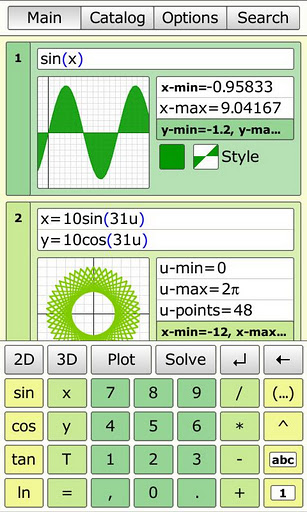
MathStudio v5.1.2 Apk App


Requirements: Android 2.1
Overview: MathStudio, formerly SpaceTime, is the most comprehensive math app available for Android phones and tablets. Whether you need a simple calculator to do your finances or a replacement for your TI graphing calculator, MathStudio is the most powerful and versatile calculator available on the Android Market

What's in this version : (Updated : December 19,2011)
Added new Capture Screenshot menu item to save screenshots
Added new Fullscreen menu item to toggle fullscreen
Fixes touch issue for tablets.
Improved support for tablets
Exit button added in the main menu
Several other improvements and bug fixes
NOTE: Default interface settings have changed. See the new "Interface Options" section in "Options" to change these new settings.
CALCULATOR
From basic calculations to college calculus, MathStudio is a full featured scientific calculator with over two hundred functions. Browse the entire list in our online manual.
http://www.mathstudio.net/manual

ALGEBRA
MathStudio is powered by MobileCAS, our powerful and lightning fast computer algebra system that beautifully typesets your answers.

CALCULUS
Solve limits, derivates, integrals and more!

2D GRAPHING
Graph equations with speed and ease you never thought was possible! MathStudio graphs 2D function, parametric, polar, implicit, contour, vector fields, fractals and images with amazing speed and accuracy.

3D GRAPHING
Rotate, pinch and graph 3D equations in real-time! MathStudio graphs 3D functions, parametric, spherical, cylindrical and vector fields.

TIME GRAPHING
MathStudio is the first and only graphing app that can also graph not only in space but in time. Use the T variable to create animated plots that plot graphs in space and time!

STATISTICS
Plot lists of numerical data in scatter, histograms, box, probability plots! MathStudio even includes an advanced regression analysis package, choose from several regression functions or create your own!

SCRIPTING
MathStudio is the ONLY calculator app that also lets you create scripts in our powerful programming language that supports variables, loops and even recursion.

NO INTERNET CONNECTION REQUIRED
Unlike other math apps, MathStudio does not require an active internet connection. It does all calculations internally for fast and instant results

Download Instructions:
http://www.filesonic.com/file/Llkok0X
http://www.multiupload.com/YM7AAIVMLV
Reade more >>

Calculator++ v1.2.22 Apk App

This summary is not available. Please click here to view the post.
Reade more >>

Tuesday, December 27, 2011

ezPDF Reader v1.7.1.1 Apk App


Requirements: Android 2.1+
Overview: ezPDF Reader is the Best Selling and the Best Rated Multimedia PDF viewer, annotator, and form filler.

Customized Viewing
Clearly presented without the fluff, documents appear as they would on your PC, but customized to fit your mobile device's screen.
Scanned and text based PDFs are all supported, including JPEG2000 and JBIG2 compression.
Select Text Reflow, Fit to Text Column, Copy and paste text in PDF view and bookmark as you go or Change Reading Direction to ease reading

PDF Form Filler
Good for application forms, school tests, and contracts.
Fill out your Tax Form with ezPDF Reader.
Fill out the contract form, sign with Freehand, and send via email from the file manager (My docs).

Multimedia PDF Viewer - Audio, Video, and TTS (using built-in Text-to-Speech feature)
Get convenient, hassle-free PDFs directly to your Android device with ezPDF Reader.
It also plays multimedia files embedded into PDF.
Perfect solution for PDF based audio/video-enabled Ebooks, such as children's books and instructional books.
(Multimedia file format must be compatible to your Android device, However, no support for Flash)
Use Voice Reading feature to have documents read to you with the continuous automatic page-turning feature.
(It uses TTS feature of the hardware settings)

Annotation Features on PDF - No need to print for marking
Useful tool to add text in text box and sticky notes;
highlight, underline, or cross out texts; draw rectangles, ovals and freehand drawings.
Add memo & image, change color / thickness, resize and move them around as you like.
All these comments are compatible with Adobe® Acrobat®. (PC or Mac version)

Please download "ezPDF Reader Cloud Plugin" App for uploading and downloading files between Google Docs & ezPDF Readeer.

More Features
- Read text based PDF file (using built-in Text-to-Speech function (TTS)), Compatible with SVOX
- Play Embedded Video & Audio (Android device supported format)
- Text View with reflow function. Option for Night / Day Mode, Able to change font size and color (text and background)
- Thumbnail image view
- Support for landscape view
- Search (Options for case sensitive, whole word or part, exact word, and/or operator) and highlighted result
- Auto Fit Zoom for multi-column article or removing white margin
- Scroll lock / unlock
- Able to select text in PDF, save to clipboard, web search, share with other apps
- Support hyperlinks (Go to page within the PDF, URL links to webpage)
- Open Standard Password-protected PDF (Important! If the file is protected with the DRM applied to PDF file, this would not open the file.)
- Intuitive bookmarking & viewing bookmarks with its description and ribbon & thumbnail image
- Auto Page Turn (in secs) or Auto Scroll (up a screen full)
- Table of Contents
- Zoom in & out (Pinch or double tap)
- Page navigation with thumbnail scroll images
- Jump to a specific page by its Page Number
- Able to change reading direction - Good for Arabic, Chinese, Japanese & Hebrew documents
- Undo & Redo button
- Support Trackball
- Page Turning Effect (Flip)
- FREE PDF Conversion Program for PC (link to download)
- 5-finger-tap : Annotation Tool On or Off
- 4-finger-tap : Notification Bar On or Off
- 3-finger-tap : PDF view or Text Reflow view
- 2-finger-tap : Reduces the page to fit the width when enlarged
- 1-finger-tap : Toggles Menu On or Off

What's in this version:
-Rendering Bugfix in specific PDF documents.

Download Instructions:
http://www.MegaShare.com/3809922

Mirrors:
http://www.filesonic.com/file/QNbXpB6
http://www.multiupload.com/LO50EMUK1R
Reade more >>

Cool Reader v3.0.54-26 + Cool Reader Gold Donation Apk App


Requirements: Android v2.1+
Overview: eBook reader. Supports epub (non-DRM), fb2, doc, txt, rtf, html, chm, tcr, pdb, prc, mobi (non-DRM), pml formats.

eBook reader. Supports epub (non-DRM), fb2, doc, txt, rtf, html, chm, tcr, pdb, prc, mobi (non-DRM), pml formats.

Pages or scroll view. Page flipping animation.
Table of contents, bookmarks, text search.
Bookmarks on text fragments (comments or corrections) - useful for proof reading.
Export of bookmarks to text file.
Built-in file browser, quick recent books access.
Online catalogs (OPDS) support.
Text to Speech (TTS) support.
Hyphenation dictionaries;
Most complete FB2 format support: styles, tables, footnotes.
Additional fonts support (place .ttf to /sdcard/fonts/)
Support for Chinese, Japanese, Korean languages; autodetection of TXT file encoding (GBK, Shift_JIS, BIG5, EUC_KR).
Day and night profiles (two sets of colors, background, backlight levels).
Brightness adjustments by flick on left edge of screen.
Background texture (stretched or tiled) or solid color.
Paperbook-like page turning animation or "sliding page" animation.
Dictionary support (ColorDict, GoldenDict, Fora Dictionary, Aard Dictionary).
Customizable tap zone and key actions.
Autoscroll (automatic page flipping) - start using menu/goto/autoscroll or assign action Autoscroll on key or tap zone; Change speed using volume keys or bottom-right and bottom-left tap zones; stop - tap any other tap zone or key.
Can read books from zip archives.
Automatic reformatting of .txt files (autodetect headings etc.)
Styles can be customised in wide range using external CSS.
Select text using double tap (optional).

Similar to FBReader, Aldiko, AlReader, Nook, Laputa, Moon+ reader.

Place additional textures to /sdcard/.cr3/textures/ -- to be used as tiled page backgrounds.
Place additional textures to /sdcard/.cr3/backgrounds/ -- to be used as stretched page backgrounds.
(/cr3/ directory can also be used instead of /.cr3/, and internal SD or internal storage instead of /sdcard/)

CoolReader is free, open source (GPL), multiplatform project.
Project homepage on SourceForge is http://sourceforge.net/projects/crengine/
To donate this project, you can buy Cool Reader Gold ($10), Silver ($3) or Bronze ($1) Donation package from Market
PayPal: coolreader.org@gmail.com

Recent changes:
- Hyphenation dictionary for Greek;
- Support for Sony T1 buttons;
- Fixed mode selection - a selection are now always visible when the.
Less description »

Latest version: 3.0.54-26 (for Android version 2.1 and higher, supports App2SD)

Note: Donation file does not add functionality for this application. It serves only to support this project.

Download Instructions:
http://www.filesonic.com/file/Kkmf7lj

Mirror:
http://www.filefat.com/dn2a63jk33xs
Reade more >>

MultiReader v1.8.2 Apk App


Requirements: Android 1.6+
Overview: eBook speaker. PDF, EPUB, RTF, PPT,... several languages spoken
MultiReader is an eBook Speaker / eReader.

eBook speaker. PDF, EPUB, RTF, PPT,... several languages spoken

MultiReader is an eBook Speaker / eReader.

eBook formats : PDF, EPUB, text, Word, RTF , Power Point.

Voices : english, spanish, french, portugese, dutch, italian, german, Finnish... all TTS engines (Pico, SVox, eSpeak, ...) , all languages

Access to online libraries.

- Very usefull for students for their lessons. To review for an exam.

- Can be used in assimilating information (eLearning), ie. foreign languages, training techniques.

- People who have difficulties with fine print (blind people).

- Simply listen documents from work or news in your car.

Download Instructions:
http://www.MegaShare.com/3809837
http://www.multiupload.com/K4RW7D9DQF
Reade more >>